Automatically create ServiceNow tickets from ServicePilot
Monitoring and ITSM integration
In an environment where every minute counts for incident management and service continuity, automatic integration between monitoring systems and IT service management (ITSM) tools is essential. This integration not only reduces incident response times, but also improves the accuracy and efficiency of interventions. By connecting these two types of systems, organizations can benefit from real-time visibility into the status of their infrastructure and services, which is essential for proactive problem management.
The integration between ServicePilot and ServiceNow perfectly illustrates this need. ServicePilot, as a monitoring solution, provides continuous and detailed monitoring of system and application performance. ServiceNow, as an ITSM platform, centralizes the management of incidents, problems, and changes. By combining these two tools, IT teams can automate the incident creation process in ServiceNow as soon as a problem is detected by ServicePilot.
In this article, we will detail how you can automatically trigger the creation of tickets in your ServiceNow ITSM platform as soon as critical alerts appears in your ServicePilot monitoring.
Architecture and operating principle
When an alert is generated in ServicePilot, a Webhook is configurable to call the ServiceNow REST API.
Thanks to this integration, key alert information (service name, criticality, description, timestamp, etc.) is automatically transmitted and an incident ticket is created in ServiceNow.
The main steps are:
1. Choose alerts and conditions
In an Alert Policy, you can define the conditions for triggering an alert that warrants creating a ticket (problems, views, resources, objects, thresholds, service status, metrics, syslogs, SNMP traps, etc.).
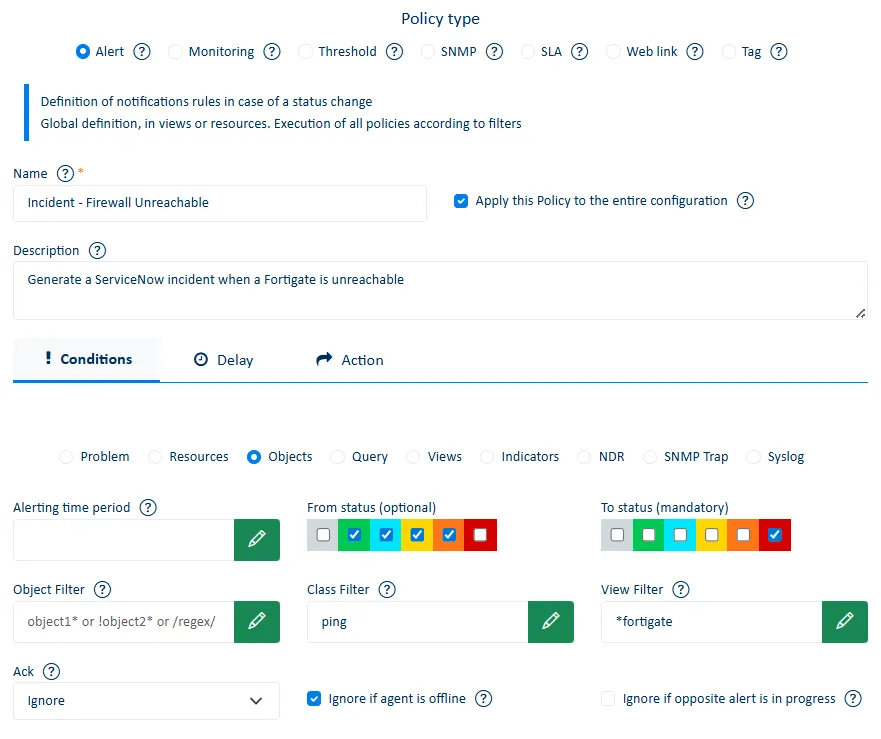
Select the type of delay to be taken into account before triggering the alert action (no delay, after x occurrences, after x minutes if still true, etc.). This feature significantly reduces noise as it prevents incidents from being created from intermittent alerts.
2. Select the Webhook action
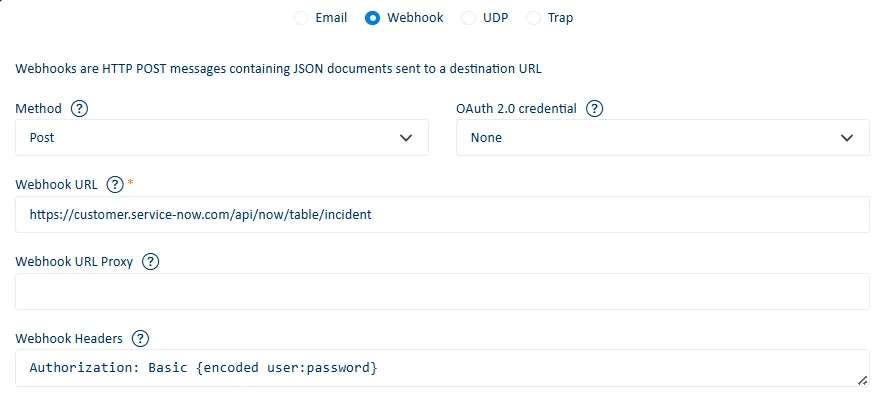
Choose the "Webhook" action to configure the message and data to be sent to the destination URL.
Enter the URL of your ServiceNow instance in the Webhook URL field in ServicePilot (e.g. https://instance.service-now.com/api/now/table/incident).
Use a ServiceNow login account with the necessary rights to create incidents and enter this in the "Webhook Headers" field.
3. Define the ticket content
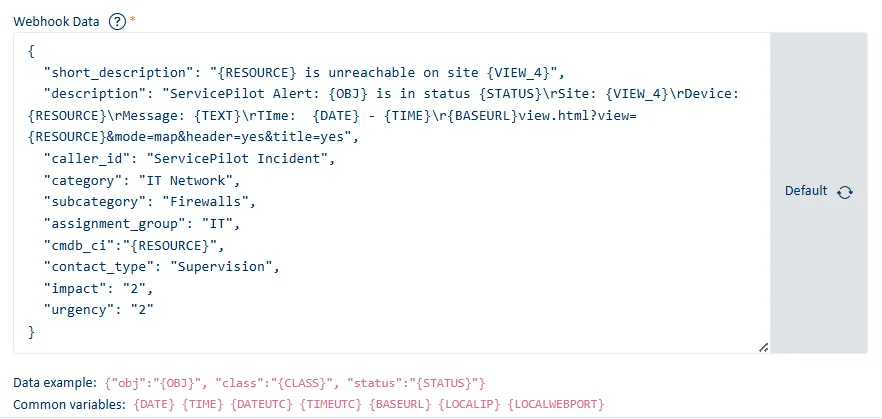
ServicePilot offers more than 30 variables to enrich and customize the JSON message before sending it to the ITSM tool.
In your ServiceNow instance, you can perform field mapping when receiving the request and automatically create a ticket (incident, request, or other type depending on your process). This allows you to match ServicePilot fields (resource name, severity, error message, etc.) with those of ServiceNow tickets (short_description, description, category, etc.).
Examples of fields to map:
- short_description --> ServicePilot alert subject
- description --> Alert details with timestamp and link to ServicePilot
- caller_id --> The service or user who reported the issue. For example, "ServicePilot incident"
- category / subcategory --> IT domain and subdomain (Server, Network, Applications, etc.)
- assignment_group --> Team responsible for handling the ticket
- cmdb_ci --> Link in the configuration management database (CMDB)
- impact / urgency --> Depending on the severity / type of service
- etc.
4. Test and refine the process
Use the Test Webhook button to verify that the ticket is displayed correctly in your ServiceNow instance.
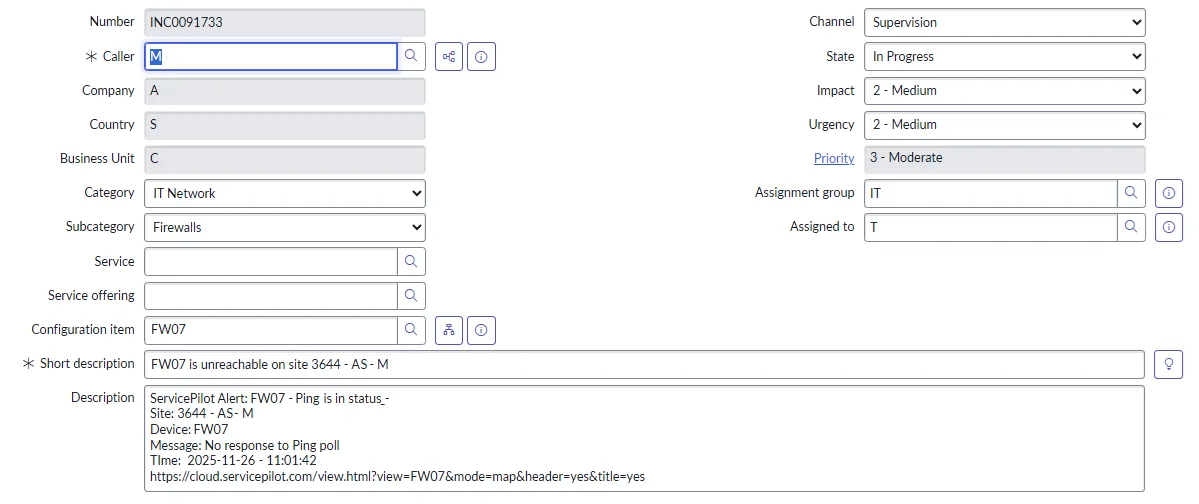
Once the first test is successful, define different ticket templates depending on the type of alert (network, application, database, etc.). Several policies can be created and the selection is global or granular depending on your needs/scope.
Enrich the ticket by adding ServicePilot's details using the variables provided.
5. Operation and best practices
Be mindful of "noise" to avoid generating a ticket for every minor fluctuation. You can define what is relevant and what is not, adjust thresholds and possibly deadlines.
Classify your services by distinguishing between "critical production", "test environment" or "dev environment" in order to adjust ticket priority.
Use the ServicePilot alert description field to document the workflow so that teams know how an automatically generated ticket should be handled.
Take advantage of ServicePilot interfaces to track the alerts that generate the most tickets and detect patterns such as equipment or services that are often in alert, frequent causes, etc.
The benefits of automation for our customers
Why automate ticket creation from ServicePilot?
- To speed up the response time of your support teams
- To ensure that no major incidents escape formalized monitoring
- To improve traceability in order to ensure that all procedures are followed in accordance with applicable standards and regulations.
- To reduce manual workload and save time—no more need to copy/paste alerts from ServicePilot to ServiceNow
In a context where speed and efficiency are paramount, the automatic integration between ServicePilot and ServiceNow offers a robust solution for incident management and service continuity. By connecting these two systems, organizations can not only improve their ability to respond quickly to incidents, but also strengthen their operational resilience and compliance.
By automating the "detection → ticket → processing" chain, you align yourself with IT best practices: a monitoring system that directly feeds your incident management in ServiceNow or other ITSM tool (iTop, GLPI, etc.).
