ServicePilot MCP Server: AI at the heart of modern observability
MCP, AI and observability: an inevitable convergence
The rise of generative AI has profoundly transformed the way IT teams diagnose and resolve incidents. Yet one challenge remains: how can an AI assistant effectively interact within a complex, distributed and data-rich environment like that of an observability platform?
This is precisely where the Model Context Protocol (MCP) comes in. It paves the way for a new generation of assistants capable not only of performing tasks and analyzing data, but also of interacting with various software applications to accelerate troubleshooting. With the arrival of the MCP ServicePilot server, it is now possible to provide these AI assistants with secured, contextualized, real-time access to production data.
MCP: the missing link between AI and tools
What is the Model Context Protocol (MCP)?
The MCP protocol (Model Context Protocol) is an open standard introduced by Anthropic in late 2024 to connect AI models (particularly LLMs) with external data sources and tools. The MCP defines a common protocol that enables AI agents to retrieve and interact with data or services in a consistent manner, regardless of their source. This universal connector replaces currently fragmented and custom integrations with a single, sustainable architecture for secured and controlled context sharing.
How does the Model Context Protocol (MCP) work?
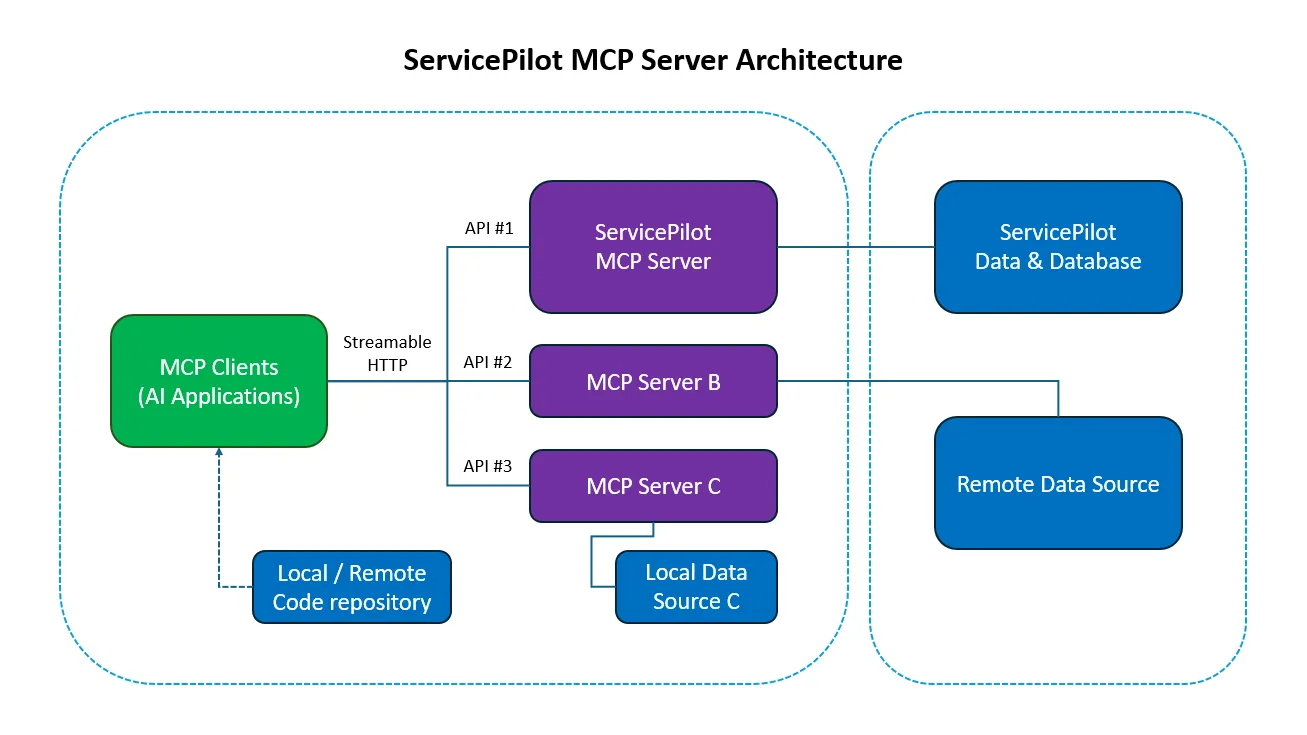
From an architectural and component perspective, MCP follows a client-server model. The MCP client is typically the agent or AI application that requires information and the MCP server is a lightweight connector that exposes a specific data source or service via the MCP standard. Developers can run multiple MCP servers (one for each repository, database, API or tool) and the agent (MCP client) can connect to all of them via a unified protocol. Rather than calling each service’s API directly, the AI agent sends a structured request to a MCP server (or to a host that aggregates the servers) describing what it needs in an abstract form. The MCP server then handles the low-level details (authentication, querying the target system, formatting the results) and returns a standardized response to the agent. This design clearly separates the AI’s reasoning from the integration logic, allowing the agent to focus on what it needs to request while the MCP servers handle how to fulfill that request.
MCP primitives are the most important concept within MCP. They define what clients and servers can offer each other. These primitives specify the types of contextual information that can be shared with AI applications and the range of actions that can be performed. MCP defines three core primitives that servers can expose:
- Tools: Executable functions that AI applications can invoke to perform actions (e.g. file operations, API calls, database queries, etc.)
- Resources: Data sources that provide contextual information to AI applications (e.g. file contents, database records, API responses, etc.)
- Prompts: Reusable templates that help structure interactions with language models (e.g. system prompts, etc.)
What is the Model Context Protocol (MCP) used for?
Using MCP, AI applications like Claude or ChatGPT can connect to data sources (e.g. local files, databases), tools (e.g. search engines, calculators) and workflows (e.g. specialized prompts) to access key information and perform tasks.
This protocol acts as a bridge between the AI and operational data:
- The AI can ask questions in natural language
- The MCP server translates these requests into calls to the software
- The AI receives contextualized responses
Here are some concrete examples of what MCP can do:
- Agents can access an online calendar and knowledge base to get a more personalized AI assistant
- Enterprise chatbots can connect to multiple databases within a company, allowing users to analyze data via chat
- An AI model can create 3D models in Blender and print them using a 3D printer
ServicePilot MCP Server: a step toward enhanced observability
ServicePilot v12 introduces a major new feature: the Remote MCP Server.
It allows MCP-compatible AI agents to interact directly with ServicePilot remotely via a MCP server exposed by the platform.
In the context of observability and monitoring, the MCP server enables an AI agent to:
- Access data sources (APIs, databases, dashboards, etc.)
- Use tools (scripts, commands, automated actions)
- Maintain a structured context between exchanges
- Operate in a sandboxed and auditable environment
For troubleshooting, MCP acts as a true “integration bus” between ServicePilot, the company’s technical ecosystem and the AI.
How does the ServicePilot MCP server work?
Here is a simple view of the architecture:
AI Assistant (ChatGPT, Claude…)
            ▲
            │
            ▼
ServicePilot MCP Server
            ▲
            │
            ▼
ServicePilot Platform
(Hosts, Objects, Views, Alerts, Dashboards, Reports, etc.)
The MCP server acts as a secure gateway between ServicePilot and compatible AI assistants:
- Receipt of the AI request
- Translation into a ServicePilot request
- Data retrieval
- Sending the data in a format usable by the AI
ServicePilot integrates the MCP protocol into a "secure by design" approach. The server manages authentication with API keys, permissions and data access. This allows you to leverage the power of AI without compromising operational security.
What can the ServicePilot MCP server do?
The MCP server allows you to connect MCP clients in just a few minutes, whether it’s ChatGPT, Anthropic’s Claude, an IDE like VS Code, JetBrains, an ITSM, collaboration platforms or other software as long as they support the Streamable HTTP transport protocol.
It offers a collection of tools (constantly evolving) that you can use from any AI client to interact with ServicePilot.
Specifically, an agent will be able to perform tasks based on the available tools:
| Tool Name | Description |
|---|---|
| McpTools-list_objects | List known objects on ServicePilot. An additional filter can be applied. |
| McpTools-count_objects | Count known objects on ServicePilot. An additional filter can be provided. |
| McpTools-list_problems | List known problems on ServicePilot. An additional filter can be applied. |
| McpTools-count_problems | Count known problems on ServicePilot. An additional filter can be applied. |
| McpTools-list_resources | List known resources on ServicePilot. An additional filter can be applied. |
| McpTools-count_resources | Count known resources on ServicePilot. An additional filter can be applied. |
| McpTools-list_views | List known views on ServicePilot. An additional filter can be provided. |
| McpTools-count_views | Count known views on ServicePilot. An additional filter can be provided. |
| McpTools-list_classes | List known classes on ServicePilot. An additional filter can be provided. |
| … | … |
All without directly exposing internal APIs, thanks to the MCP protocol, which encapsulates interactions within a secured and controlled framework.
A MCP server for smarter and automated observability
The integration of the Model Context Protocol into ServicePilot ushers in a new era for monitoring and observability. It transforms ServicePilot into a true interaction hub for agents and AI assistants. By accessing ServicePilot data directly, a MCP server can transform the way teams understand, analyze and resolve issues.
The ServicePilot MCP server unlocks unprecedented possibilities:
- Accelerated troubleshooting
- Simplified understanding
- Intelligent automation
- Observability integrated into workflows
Observability is no longer just a set of dashboards: it becomes conversational, intelligent and integrated.
