IBM z/OS Mainframe
ServicePilot TDSLink - NBA for z/OS
Mainframe network tracing and observability from z/OS v1r5 to z/OS v3r2.
Note: ServicePilot NBA for z/OS is no longer available as a free version from z/OS v3r1, please contact us for more information [email protected].
Trace Edition
NBA for z/OS Trace Edition captures all the IP traffic flowing through the IP dataspace. This traffic can be viewed, either while the trace is running or once it has been archived. NBA for z/OS Trace Edition complies with RACF and supports multiple IP stacks and can be secured with HTTPS. Here are the key features offered by NBA for z/OS Trace Edition:
- A real-time and easy-to-use IP tracing tool. A single click starts a trace on the mainframe.
- Trace data can be saved in PCAP or text format for analysis with third party tools.
- Trace filtering on IP address, port number and interface.
- Limit capture duration to 1 minute, 15 minutes or unlimited.
- User-friendly web interface to display a meaningful presentation of the trace.
Full Edition
NBA for z/OS Full Edition can be used either by network or security engineers. Here are the key features offered by NBA for z/OS Full Edition:
- All the Trace Edition features: Realtime traces, export as PCAP, …
- Network security: Interface activity, local and remote application activity, Network activity, client behavior.
- Network performance: IP traffic, IP maximum load, top ten traffic, top ten host and network response times, TCP active connections, TCP start/stop/reject connections, TCP/IP buffer.
- Operations and diagnosis interfaces.
- Alerts via SNMP Trap, WTO, Logs, Syslog, e-mail.
- System logs collection.
- API to export zOS logs and network statistics in real time.
- Integration with ServicePilot SaaS or On-premise.
A month free trial is available on demand. Do not hesitate to request one at: [email protected].
NBA for z/OS web interface
A single click in the web interface of NBA for z/OS immediately triggers a trace on the mainframe, capturing all IP traffic flowing through the IP dataspace. This feature provides essential visibility into mainframe connectivity and overall network efficiency. Fully RACF-compliant and compatible with multiple IP stacks, the tool allows you to view traffic in real time while the trace is running or after it has been archived.
The interface presents data in a clear and actionable way, with advanced filtering capabilities based on IP address, port number, or network interface. Traces can also be exported in PCAP or text format for in-depth analysis using third-party tools.
The interface has several dedicated sections, covering in particular:
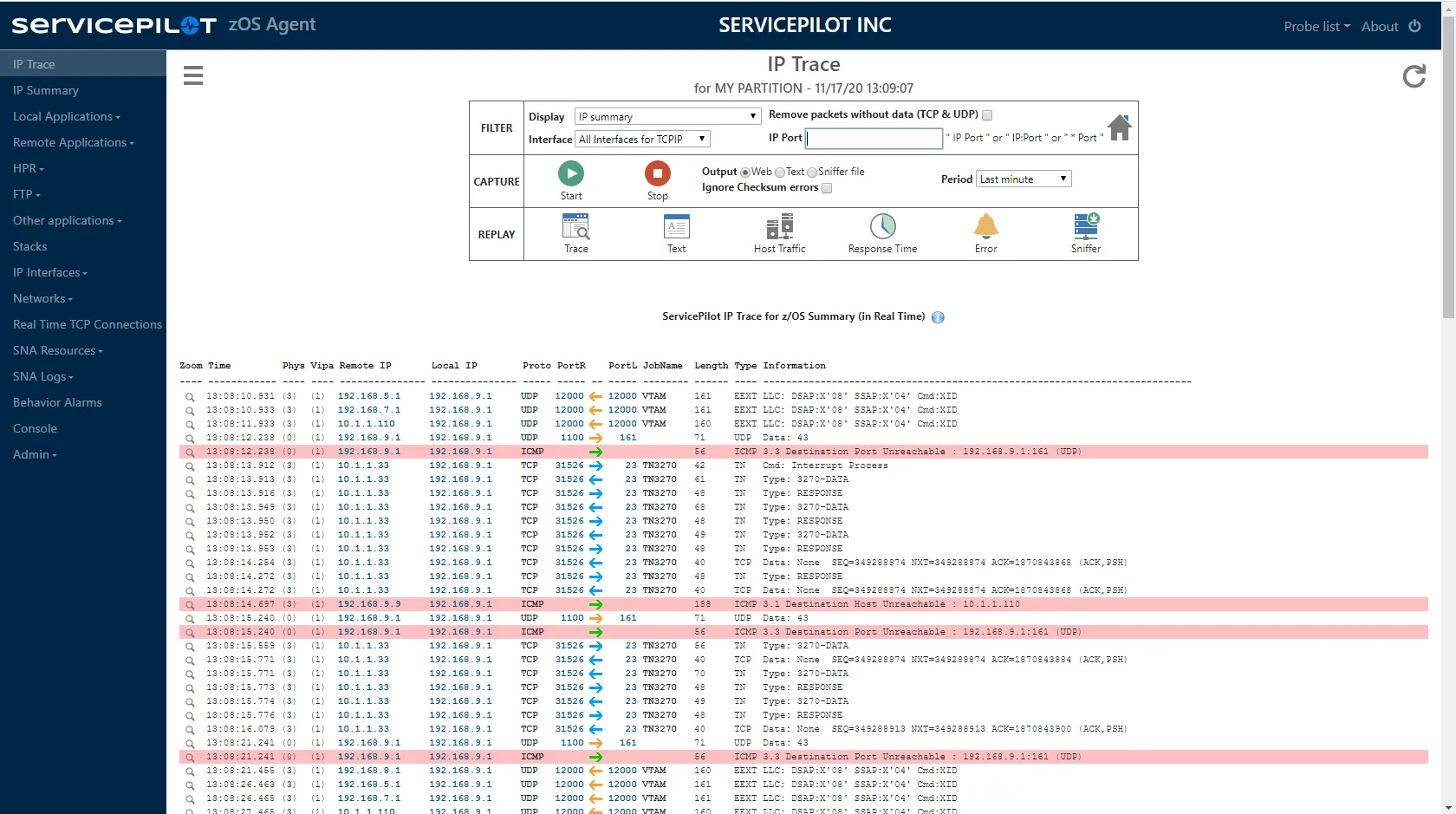
- IP Trace: Detailed analysis of captured traffic
- IP Summary: Summary view of IP flows
- Local and remote applications
- HPR
- FTP
- Other applications
- IP stacks
- IP interfaces
- Networks
- Real-time TCP connections
- SNA resources
- SNA logs, etc.
Each section provides a complementary perspective, enabling a detailed understanding of the mainframe’s network behavior and facilitating diagnosis and performance optimization.
Integration with ServicePilot
NBA for z/OS integrates with ServicePilot, enabling the transmission of events and metrics to ServicePilot SaaS or On‑Premise. This integration provides several key capabilities:
- Data correlation: NBA for z/OS data can be viewed in ServicePilot and correlated with other infrastructure components, such as by displaying the status of LPARs alongside that of network switches.
- Maps and graphical analysis: Network traces collected by NBA for z/OS can be viewed graphically, with filtering options and access to detailed packet information.
- Flow analytics: Network flow data is aggregated into numerical indicators, and Machine Learning algorithms generate behavioral trends.
- Alerting: Thresholds can be configured to trigger alerts based on conditions critical to your environment.
- ServicePilot features: Users benefit from the full ServicePilot feature set, including the Data Explorer, custom widgets, custom dashboards, PDF reports and more.
NBA for z/OS integrates natively with ServicePilot requiring a minimum amount of configuration. Refer to the ServicePilot package documentation integrated in the ServicePilot web interface.
- Install NBA for z/OS Agent with a Full Edition license key.
- Install ServicePilot and a ServicePilot Agent in your datacenter (on a Windows server).
- Use the ServicePilot SaaS or On premise web interface to provision a nettrace-zos package which will automatically add a server-zos-sp-agent resource.
You will be able to quickly access all the statistics and logs from your NBA for z/OS instances.
APIs
Get Network conversations metrics
This API allows you to get active network conversations with statistics. The output is in CSV format (, separator). This CSV is updated every minute.
Get Network conversations metrics details
URL: {nbaforzos_url}/api/nettrace
Method: GET
Sample response:
firsttime,lasttime,clientagent,serveragent,clientip,clientport,clientprocess,serverip,serverport,serverprocess,proto,isserverlocal,bytesin,bytesout,packetsin,packetsout,tcpdupack,tcpretransmit,tcpwindow,tcpstart,tcpstartinprivate,tcpstartinpublic,tcpstartoutprivate,tcpstartoutpublic,tcpend,tcpendin,tcpendout,tcprejected,tcpreset,tcphostrt,tcpnetwrt,tcphostnb,tcpnetwnb
2026-05-09T14:36:18.697972Z,2026-05-09T14:36:18.697972Z,adcd,adcd,192.168.9.1,161,tcpip,192.168.9.1,1036,,udp,0,0,71,0,1,0,0,0,0,0,0,0,0,0,0,0,0,0,0,0,0,0
2026-05-09T14:36:45.306299Z,2026-05-09T14:36:45.338496Z,,adcd,10.1.1.33,9234,,192.168.9.1,83,nba4zos,tcp,1,271,345,4,6,0,0,0,1,1,0,0,0,1,0,1,0,0,19,0,1,0
2026-05-09T14:37:07.700510Z,2026-05-09T14:37:10.701708Z,adcd,adcd,192.168.9.1,161,tcpip,192.168.9.1,1037,,udp,0,71,71,1,1,0,0,0,0,0,0,0,0,0,0,0,0,0,0,0,0,0
2026-05-09T14:36:23.702382Z,2026-05-09T14:37:10.341902Z,,adcd,192.168.8.1,12000,,192.168.9.1,12000,vtam,udp,1,160,480,1,3,0,0,0,0,0,0,0,0,0,0,0,0,0,0,0,0,0
2026-05-09T14:36:45.339658Z,2026-05-09T14:36:45.363041Z,,adcd,10.1.1.33,9235,,192.168.9.1,83,nba4zos,tcp,1,315,2271,5,7,0,0,0,1,1,0,0,0,1,0,1,0,0,16,5,1,1
2026-05-09T14:36:24.204239Z,2026-05-09T14:37:10.842366Z,,adcd,192.168.7.1,12000,,192.168.9.1,12000,vtam,udp,1,161,483,1,3,0,0,0,0,0,0,0,0,0,0,0,0,0,0,0,0,0
2026-05-09T14:36:24.206120Z,2026-05-09T14:37:10.844711Z,,adcd,192.168.5.1,12000,,192.168.9.1,12000,vtam,udp,1,161,483,1,3,0,0,0,0,0,0,0,0,0,0,0,0,0,0,0,0,0
2026-05-09T14:36:24.208031Z,2026-05-09T14:37:10.854016Z,,adcd,10.1.1.110,12000,,192.168.9.1,12000,vtam,udp,1,160,480,1,3,0,0,0,0,0,0,0,0,0,0,0,0,0,0,0,0,0
2026-05-09T14:36:26.849896Z,2026-05-09T14:36:57.850276Z,,adcd,192.168.9.9,,tcpip,192.168.9.1,,,icmp,1,376,188,2,1,0,0,0,0,0,0,0,0,0,0,0,0,0,0,0,0,0
2026-05-09T14:36:12.695893Z,2026-05-09T14:37:10.701909Z,adcd,adcd,192.168.9.1,,tcpip,192.168.9.1,,,icmp,1,168,56,3,1,0,0,0,0,0,0,0,0,0,0,0,0,0,0,0,0,0
...
Get z/OS logs
This API allows you to receive live zOS system logs on a permanent HTTP connection.
Get z/OS logs details
URL: {nbaforzos_url}/api/logs
Method: GET
Sample response:
N        ADCD    202110411.03.29.67TSU00075P NBA4ZOSF
N        ADCD    202110411.03.29.68STC00076TLO010I PTDS      MAX/TRANS=0000002  MAX/TERM=0000002  EVE/SEC=0000003
N        ADCD    202110411.03.29.71STC00076TLO012I PTERMM   END OF TDSLINK
N        ADCD    202110411.03.29.79STC00076-                                              --TIMINGS (MINS.)--            -----PAGING COUNTS----
N        ADCD    202110411.03.29.79STC00076-STEPNAME PROCSTEP    RC   EXCP   CONN    TCB    SRB  CLOCK   SERV  WORKLOAD  PAGE  SWAP   VIO SWAPS
N        ADCD    202110411.03.29.80STC00076-         TDSLINK     00    445      0    .06    .02   36.4   279K  STARTED      0     0     0     0
N        ADCD    202110411.03.29.80STC00076IEF404I NBA4ZOSF - ENDED - TIME=11.03.29
Get Local applications
This API allows you to get statistics and information about local applications in InfluxDB format.
Get Local applications details
Information:
- Application information: Host, protocol, port, …
- Application volume statistics: Packets, bytes, bps, pps, …
- Application TCP activity: tcpstart, tcprejected, tcpwindow, tcpdupack, …
- Application TCP response times: tcphostrt, tcpnetwrt
URL: {nbaforzos_url}/api/stats/lapp
Method: GET
Sample response:
localapp,host="adcd",proto="tcp",serverport=22,program="sshd4" packetsin=0,packetsout=0,bytesin=0,bytesout=0,maxppsin=0,maxppsout=0,maxbpsin=0,maxbpsout=0,tcpstart=0,tcpend=0,tcprejected=0,tcphostrt=0,tcpnetwrt=0,tcpdupack=0,tcpretransmit=0,tcpwindow=0,tcpstartinprivate=0,tcpstartinpublic=0,tcpstartoutprivate=0,tcpstartoutpublic=0,tcpendin=0,tcpendout=0,tcpreset=0,conversations=0 1618398282000000000
localapp,host="adcd",proto="tcp",serverport=23,program="telnet" packetsin=629,packetsout=676,bytesin=31014,bytesout=472169,maxppsin=9,maxppsout=9,maxbpsin=3606,maxbpsout=67554,tcpstart=5,tcpend=2,tcprejected=0,tcphostrt=106,tcpnetwrt=8,tcpdupack=1,tcpretransmit=3,tcpwindow=0,tcpstartinprivate=5,tcpstartinpublic=0,tcpstartoutprivate=0,tcpstartoutpublic=0,tcpendin=0,tcpendout=2,tcpreset=0,conversations=2,bytesintopip="10.1.1.170",bytesouttopip="10.1.1.170" 1618398282000000000
localapp,host="adcd",proto="tcp",serverport=80,program="httpd1" packetsin=0,packetsout=0,bytesin=0,bytesout=0,maxppsin=0,maxppsout=0,maxbpsin=0,maxbpsout=0,tcpstart=0,tcpend=0,tcprejected=0,tcphostrt=0,tcpnetwrt=0,tcpdupack=0,tcpretransmit=0,tcpwindow=0,tcpstartinprivate=0,tcpstartinpublic=0,tcpstartoutprivate=0,tcpstartoutpublic=0,tcpendin=0,tcpendout=0,tcpreset=0,conversations=0 1618398282000000000
Get Remote applications
This API allows you to get statistics and information about remote applications in InfluxDB format.
Get Remote applications details
Information:
- Application information: Host, protocol, port, ip, …
- Application volume statistics: Packets, bytes, bps, pps, …
- Application TCP activity: tcpstart, tcprejected, tcpwindow, tcpdupack, …
- Application TCP response times: tcphostrt, tcpnetwrt
URL: {nbaforzos_url}/api/stats/rapp
Method: GET
Sample response:
remoteapp,host="adcd",rem_prot="tcp",rem_port=21,rem_ip="10.1.1.33",rem_stack_name="tcpip",rem_agr_name="ftp\ control" rem_pkt_in=135,rem_pkt_out=123,rem_byt_in=10583,rem_byt_out=7846,rem_pps_in=5,rem_pps_out=5,rem_bps_in=3545,rem_bps_out=2626,rem_pkt_64_in=31,rem_pkt_128_in=104,rem_pkt_256_in=0,rem_pkt_512_in=0,rem_pkt_1024_in=0,rem_pkt_1025_in=0,rem_pkt_64_out=76,rem_pkt_128_out=47,rem_pkt_256_out=0,rem_pkt_512_out=0,rem_pkt_1024_out=0,rem_pkt_1025_out=0,rem_pkt_frag_in=0,rem_pkt_frag_out=0,rem_tcp_cn_sta=9,rem_tcp_cn_sto=10,rem_tcp_cn_rej=0,rem_tcp_cn_act=0,rem_max_hrt=280,rem_avg_hrt=11,rem_max_nrt=56,rem_avg_nrt=4,rem_tcp_dup_ack=0,rem_tcp_retrmt=0,rem_tcp_window=0,rem_hrt_inf_1=66,rem_hrt_inf_2=0,rem_hrt_inf_5=0,rem_hrt_inf_10=0,rem_hrt_sup_10=0,rem_nrt_inf_1=66,rem_nrt_inf_2=0,rem_nrt_inf_5=0,rem_nrt_inf_10=0,rem_nrt_sup_10=0,rem_frag_in_per=0.00,rem_frag_out_per=0.00,rem_dup_ack_per=0.00,rem_retrmt_per=0.00,rem_window_per=0.00 1618398393000000000
remoteapp,host="adcd",rem_prot="tcp",rem_port=25,rem_ip="10.1.1.33",rem_stack_name="tcpip",rem_agr_name="smtp" rem_pkt_in=5,rem_pkt_out=5,rem_byt_in=200,rem_byt_out=300,rem_pps_in=1,rem_pps_out=1,rem_bps_in=31,rem_bps_out=47,rem_pkt_64_in=5,rem_pkt_128_in=0,rem_pkt_256_in=0,rem_pkt_512_in=0,rem_pkt_1024_in=0,rem_pkt_1025_in=0,rem_pkt_64_out=5,rem_pkt_128_out=0,rem_pkt_256_out=0,rem_pkt_512_out=0,rem_pkt_1024_out=0,rem_pkt_1025_out=0,rem_pkt_frag_in=0,rem_pkt_frag_out=0,rem_tcp_cn_sta=0,rem_tcp_cn_sto=0,rem_tcp_cn_rej=5,rem_tcp_cn_act=0,rem_max_hrt=0,rem_avg_hrt=0,rem_max_nrt=0,rem_avg_nrt=0,rem_tcp_dup_ack=0,rem_tcp_retrmt=0,rem_tcp_window=0,rem_hrt_inf_1=0,rem_hrt_inf_2=0,rem_hrt_inf_5=0,rem_hrt_inf_10=0,rem_hrt_sup_10=0,rem_nrt_inf_1=0,rem_nrt_inf_2=0,rem_nrt_inf_5=0,rem_nrt_inf_10=0,rem_nrt_sup_10=0,rem_frag_in_per=0.00,rem_frag_out_per=0.00,rem_dup_ack_per=0.00,rem_retrmt_per=0.00,rem_window_per=0.00 1618398393000000000
Get Interface metrics
This API allows you to get statistics and information about network interfaces in InfluxDB format.
Get Interface metrics details
Information:
- Interface information: Host, name, stack, ip, …
- Interface volume statistics: Packets, bytes, bps, pps, …
- Interface TCP activity: tcpstart, tcprejected, tcpwindow, tcpdupack, …
- Interface TCP response times: tcphostrt, tcpnetwrt
URL: {nbaforzos_url}/api/stats/intf
Method: GET
Sample response:
interface,host="adcd",int_tcpip="tcpip",int_link_name="loopback",int_ip="127.0.0.1" int_pkt_in=6630,int_pkt_out=0,int_byt_in=421005,int_byt_out=0,int_pps_in=1,int_pps_out=0,int_bps_in=301,int_bps_out=0,int_pkt_64_in=3315,int_pkt_128_in=3315,int_pkt_256_in=0,int_pkt_512_in=0,int_pkt_1024_in=0,int_pkt_1025_in=0,int_pkt_64_out=0,int_pkt_128_out=0,int_pkt_256_out=0,int_pkt_512_out=0,int_pkt_1024_out=0,int_pkt_1025_out=0,int_pkt_frag_in=0,int_pkt_frag_out=0,int_tcp_cn_sta=0,int_tcp_cn_sto=0,int_tcp_cn_rej=0,int_tcp_cn_act=0,int_icmp_in=185640,int_icmp_out=0,int_igmp_in=0,int_igmp_out=0,int_tcp_in=0,int_tcp_out=0,int_igrp_in=0,int_igrp_out=0,int_udp_in=235365,int_udp_out=0,int_gre_in=0,int_gre_out=0,int_esp_in=0,int_esp_out=0,int_ah_in=0,int_ah_out=0,int_eigrp_in=0,int_eigrp_out=0,int_ospf_in=0,int_ospf_out=0,int_l2tp_in=0,int_l2tp_out=0,int_othr_in=0,int_othr_out=0,int_tcp_dup_ack=0,int_tcp_retrmt=0,int_tcp_window=0,int_load_in=0.00,int_load_out=0.00,int_frag_in_per=0.00,int_frag_out_per=0.00,int_dup_ack_per=0.00,int_retrmt_per=0.00,int_window_per=0.00,int_req_per_min=0,int_sta_in_priv=0,int_sta_in_pub=0,int_sta_out_priv=0,int_sta_out_pub=0,int_sto_in=0,int_sto_out=0,int_tcp_cn_res=0 1618398657000000000
interface,host="adcd",int_tcpip="tcpip",int_link_name="lnkvipa",int_ip="192.168.9.1" int_pkt_in=72179,int_pkt_out=178366,int_byt_in=4501888,int_byt_out=197101581,int_pps_in=426,int_pps_out=2147,int_bps_in=138011,int_bps_out=24109041,int_pkt_64_in=58223,int_pkt_128_in=4760,int_pkt_256_in=9010,int_pkt_512_in=86,int_pkt_1024_in=100,int_pkt_1025_in=0,int_pkt_64_out=19064,int_pkt_128_out=166,int_pkt_256_out=20212,int_pkt_512_out=11142,int_pkt_1024_out=1926,int_pkt_1025_out=125856,int_pkt_frag_in=0,int_pkt_frag_out=0,int_tcp_cn_sta=5626,int_tcp_cn_sto=5749,int_tcp_cn_rej=56,int_tcp_cn_act=5,int_icmp_in=1129907,int_icmp_out=319,int_igmp_in=0,int_igmp_out=0,int_tcp_in=3136616,int_tcp_out=193877940,int_igrp_in=0,int_igrp_out=0,int_udp_in=235365,int_udp_out=3223322,int_gre_in=0,int_gre_out=0,int_esp_in=0,int_esp_out=0,int_ah_in=0,int_ah_out=0,int_eigrp_in=0,int_eigrp_out=0,int_ospf_in=0,int_ospf_out=0,int_l2tp_in=0,int_l2tp_out=0,int_othr_in=0,int_othr_out=0,int_tcp_dup_ack=70,int_tcp_retrmt=1004,int_tcp_window=404,int_load_in=0.00,int_load_out=0.00,int_frag_in_per=0.00,int_frag_out_per=0.00,int_dup_ack_per=0.03,int_retrmt_per=0.40,int_window_per=0.16,int_req_per_min=0,int_sta_in_priv=5626,int_sta_in_pub=0,int_sta_out_priv=0,int_sta_out_pub=0,int_sto_in=40,int_sto_out=5584,int_tcp_cn_res=2 1618398657000000000
interface,host="adcd",int_tcpip="tcpip",int_link_name="samehlnk",int_ip="" int_pkt_in=0,int_pkt_out=0,int_byt_in=0,int_byt_out=0,int_pps_in=0,int_pps_out=0,int_bps_in=0,int_bps_out=0,int_pkt_64_in=0,int_pkt_128_in=0,int_pkt_256_in=0,int_pkt_512_in=0,int_pkt_1024_in=0,int_pkt_1025_in=0,int_pkt_64_out=0,int_pkt_128_out=0,int_pkt_256_out=0,int_pkt_512_out=0,int_pkt_1024_out=0,int_pkt_1025_out=0,int_pkt_frag_in=0,int_pkt_frag_out=0,int_tcp_cn_sta=0,int_tcp_cn_sto=0,int_tcp_cn_rej=0,int_tcp_cn_act=0,int_icmp_in=0,int_icmp_out=0,int_igmp_in=0,int_igmp_out=0,int_tcp_in=0,int_tcp_out=0,int_igrp_in=0,int_igrp_out=0,int_udp_in=0,int_udp_out=0,int_gre_in=0,int_gre_out=0,int_esp_in=0,int_esp_out=0,int_ah_in=0,int_ah_out=0,int_eigrp_in=0,int_eigrp_out=0,int_ospf_in=0,int_ospf_out=0,int_l2tp_in=0,int_l2tp_out=0,int_othr_in=0,int_othr_out=0,int_tcp_dup_ack=0,int_tcp_retrmt=0,int_tcp_window=0,int_load_in=0.00,int_load_out=0.00,int_frag_in_per=0.00,int_frag_out_per=0.00,int_dup_ack_per=0.00,int_retrmt_per=0.00,int_window_per=0.00,int_req_per_min=0,int_sta_in_priv=0,int_sta_in_pub=0,int_sta_out_priv=0,int_sta_out_pub=0,int_sto_in=0,int_sto_out=0,int_tcp_cn_res=0 1618398657000000000
Get Network metrics
This API allows you to get statistics and information about networks in InfluxDB format.
Get Network metrics details
Information:
- Network information: Host, subnetip
- Network volume statistics: Packets, bytes, bps, pps, …
- Network TCP activity: tcpstart, tcprejected, tcpwindow, tcpdupack, …
- Network TCP response times: tcphostrt, tcpnetwrt
URL: {nbaforzos_url}/api/stats/netw
Method: GET
Sample response:
network,host="adcd",net_ipaddr="10.1.1" net_pkt_in=71593,net_pkt_out=195138,net_byt_in=3577211,net_byt_out=242301404,net_pps_in=439,net_pps_out=2147,net_bps_in=141190,net_bps_out=24108786,net_pkt_64_in=65930,net_pkt_128_in=1544,net_pkt_256_in=3934,net_pkt_512_in=85,net_pkt_1024_in=100,net_pkt_1025_in=0,net_pkt_64_out=18955,net_pkt_128_out=213,net_pkt_256_out=5143,net_pkt_512_out=11117,net_pkt_1024_out=1935,net_pkt_1025_out=157775,net_pkt_frag_in=0,net_pkt_frag_out=0,net_tcp_cn_sta=5587,net_tcp_cn_sto=5711,net_tcp_cn_rej=61,net_tcp_cn_act=5,net_icmp_in=319,net_icmp_out=319,net_igmp_in=0,net_igmp_out=0,net_tcp_in=3576892,net_tcp_out=241499005,net_igrp_in=0,net_igrp_out=0,net_udp_in=0,net_udp_out=802080,net_gre_in=0,net_gre_out=0,net_esp_in=0,net_esp_out=0,net_ah_in=0,net_ah_out=0,net_eigrp_in=0,net_eigrp_out=0,net_ospf_in=0,net_ospf_out=0,net_l2tp_in=0,net_l2tp_out=0,net_othr_in=0,net_othr_out=0,net_max_hrt=5125,net_avg_hrt=61,net_max_nrt=69,net_avg_nrt=8,net_tcp_dup_ack=1414,net_tcp_retrmt=2957,net_tcp_window=404,net_hrt_inf_1=5840,net_hrt_inf_2=7,net_hrt_inf_5=5,net_hrt_inf_10=1,net_hrt_sup_10=0,net_nrt_inf_1=269,net_nrt_inf_2=0,net_nrt_inf_5=0,net_nrt_inf_10=0,net_nrt_sup_10=0,net_frag_in_per=0.00,net_frag_out_per=0.00,net_dup_ack_per=0.53,net_retrmt_per=1.11,net_window_per=0.15 1618398546000000000
network,host="adcd",net_ipaddr="192.168.5" net_pkt_in=0,net_pkt_out=5013,net_byt_in=0,net_byt_out=807093,net_pps_in=0,net_pps_out=1,net_bps_in=0,net_bps_out=127,net_pkt_64_in=0,net_pkt_128_in=0,net_pkt_256_in=0,net_pkt_512_in=0,net_pkt_1024_in=0,net_pkt_1025_in=0,net_pkt_64_out=0,net_pkt_128_out=0,net_pkt_256_out=5013,net_pkt_512_out=0,net_pkt_1024_out=0,net_pkt_1025_out=0,net_pkt_frag_in=0,net_pkt_frag_out=0,net_tcp_cn_sta=0,net_tcp_cn_sto=0,net_tcp_cn_rej=0,net_tcp_cn_act=0,net_icmp_in=0,net_icmp_out=0,net_igmp_in=0,net_igmp_out=0,net_tcp_in=0,net_tcp_out=0,net_igrp_in=0,net_igrp_out=0,net_udp_in=0,net_udp_out=807093,net_gre_in=0,net_gre_out=0,net_esp_in=0,net_esp_out=0,net_ah_in=0,net_ah_out=0,net_eigrp_in=0,net_eigrp_out=0,net_ospf_in=0,net_ospf_out=0,net_l2tp_in=0,net_l2tp_out=0,net_othr_in=0,net_othr_out=0,net_max_hrt=0,net_avg_hrt=0,net_max_nrt=0,net_avg_nrt=0,net_tcp_dup_ack=0,net_tcp_retrmt=0,net_tcp_window=0,net_hrt_inf_1=0,net_hrt_inf_2=0,net_hrt_inf_5=0,net_hrt_inf_10=0,net_hrt_sup_10=0,net_nrt_inf_1=0,net_nrt_inf_2=0,net_nrt_inf_5=0,net_nrt_inf_10=0,net_nrt_sup_10=0,net_frag_in_per=0.00,net_frag_out_per=0.00,net_dup_ack_per=0.00,net_retrmt_per=0.00,net_window_per=0.00 1618398546000000000
network,host="adcd",net_ipaddr="192.168.7" net_pkt_in=0,net_pkt_out=5014,net_byt_in=0,net_byt_out=807254,net_pps_in=0,net_pps_out=1,net_bps_in=0,net_bps_out=255,net_pkt_64_in=0,net_pkt_128_in=0,net_pkt_256_in=0,net_pkt_512_in=0,net_pkt_1024_in=0,net_pkt_1025_in=0,net_pkt_64_out=0,net_pkt_128_out=0,net_pkt_256_out=5014,net_pkt_512_out=0,net_pkt_1024_out=0,net_pkt_1025_out=0,net_pkt_frag_in=0,net_pkt_frag_out=0,net_tcp_cn_sta=0,net_tcp_cn_sto=0,net_tcp_cn_rej=0,net_tcp_cn_act=0,net_icmp_in=0,net_icmp_out=0,net_igmp_in=0,net_igmp_out=0,net_tcp_in=0,net_tcp_out=0,net_igrp_in=0,net_igrp_out=0,net_udp_in=0,net_udp_out=807254,net_gre_in=0,net_gre_out=0,net_esp_in=0,net_esp_out=0,net_ah_in=0,net_ah_out=0,net_eigrp_in=0,net_eigrp_out=0,net_ospf_in=0,net_ospf_out=0,net_l2tp_in=0,net_l2tp_out=0,net_othr_in=0,net_othr_out=0,net_max_hrt=0,net_avg_hrt=0,net_max_nrt=0,net_avg_nrt=0,net_tcp_dup_ack=0,net_tcp_retrmt=0,net_tcp_window=0,net_hrt_inf_1=0,net_hrt_inf_2=0,net_hrt_inf_5=0,net_hrt_inf_10=0,net_hrt_sup_10=0,net_nrt_inf_1=0,net_nrt_inf_2=0,net_nrt_inf_5=0,net_nrt_inf_10=0,net_nrt_sup_10=0,net_frag_in_per=0.00,net_frag_out_per=0.00,net_dup_ack_per=0.00,net_retrmt_per=0.00,net_window_per=0.00 1618398546000000000
NBA for z/OS installation
Requirements
- z/OS v1r5 to v3r2
- A NBA for z/OS product key
- The NBA for z/OS software
Installation steps
Download and unzip files from
TDSLink-NBA_for_zOS.zip.Upload and receive NBA for z/OS load file.
Upload
NBA_for_zOS_9.0_yyqqq.xmifrom the unzipped folder (previous step) with FTP or IND$FILE to z/OS using a binary file transfer method (no CRLF or ASCII translation) into a dataset (e.g.:NBA4ZOS.TEMP.XMI) with the following format:LRECL=80,RECFM=FB,DSORG=PSWith TSO, issue the
RECEIVEcommand to put the file into PDS format:=> TSO RECEIVE INDATASET(‘NBA4ZOS.TEMP.XMI’)When prompted by the
RECEIVEcommand, enter:DA(‘NBA4ZOS.V90.LOAD’) UNIT(unit) VOLUME(volume)
Perform APF authorization for NBA for z/OS LOADLIB.
Use either a Static or Dynamic APF authorization.
Static
- Create or modify
PROGxxin your PARMLIB. - Define the NBA for z/OS LOADLIB and its volume.
- Activate it (
SET PROG=xx).
Dynamic
The command below allows a dynamic definition in console mode:
SETPROG APF ADD DSN=NBA4ZOS.V90.LOAD,VOL=......- Create or modify
Create the started task – STC.
Create the STC into a system PROCLIB - e.g.:
SYS1.PROCLIB(NBA4ZOS).Example:
//NBA4ZOS PROC
//*
//NBA4ZOS EXEC PGM=PTDS,TIME=1440,REGION=0M
//*
//STEPLIB  DD DISP=SHR,DSN=NBA4ZOS.V90.LOAD
//SYSIN    DD DUMMY
//*SYSIN   DD DISP=SHR,DSN=NBA4ZOS.PARMLIB(SYSIN)
//SYSABEND DD SYSOUT=*
//TDSLOG   DD SYSOUT=*
//SYSTRACE DD SYSOUT=*
//TLOALARM DD SYSOUT=*
//*
Customize the started task.
Define RACF authorization.
Define NBA for z/OS to RACF and authorize NBA for z/OS userid to use Open Edition Services. If necessary, contact your security administrator.
Below is a job with a RACF definition example:
//RACF JOB
//*
//* Define RACF resources for NBA for z/OS
//*
//RACF EXEC PGM=IKJEFT01
//SYSTSPRT DD SYSOUT=*
//SYSTSIN  DD *
  AG nbagrp OWNER(racfadmuser)
  AU nbauser OWNER(racfadmuser) DFLTGRP(nbagrp) NOPASSWORD
  RDEF STARTED NBA4ZOS.* STDATA(USER(nbauser)) OWNER(racfadmuser)
  SETROPTS RACLIST(STARTED) REFRESH
  ALG nbagrp OMVS(GID(nnn))
  ALU nbauser DFLTGRP(nbagrp) NOPASSWORD OMVS(UID(nnn))
//*
Note:
- The
nnnwildcard must be replaced by the Group ID and the User ID you chose. - The
nbagrpandnbauserwildcards must be replaced by the NBA for z/OS Free Edition Group and User name you chose. - The
racfadmuserwildcard must be replaced by the RACF owner user.
- The
[if required by installation]
Authorize NBA for z/OS to access the files defined in the start procedure.
[if required by installation]
Authorize NBA for z/OS to send commands such as
V TCPIP,,PKT.To do so, NBA for z/OS userid must access the MVS.VARY.TCPIP.* profile of the OPERCMDS class with the CONTROL level.
Define the NBA for z/OS parameters (in the optional SYSIN file or the STC parm).
When defining NBA for z/OS parameters, priority is given to the STC parameters (
PARM=in theEXECcard).//NBA4ZOS PROC //NBA4ZOS EXEC PGM=PTDS,PARM='WEBPORT=80',TIME=1440,REGION=0MWhen a parameter is defined in the STC, it may be overridden with
PARM=in the start command.S NBA4ZOS,PARM='WEBPORT=8080'If a parameter is not defined, NBA for z/OS looks in the SYSIN file and finally in the NBA for z/OS “Defaults”.
SYSIN.txt
*   +------------------------------------+
*   |     N B A 4 Z O S    V . 9 . 0     |
*   |                                    |
*   |        P A R A M E T E R S         |
*   |                                    |
*   |  Ref: NBA for zOS v.9.0            |
*   |       User Guide                   |
*   |                                    |
*   +------------------------------------+

* 1. SYSTEM PARAMETERS

  KEY  XXXXXXXXXXXXX         KEY FOR COMMERCIAL VERSION
  TRACE N
  COUNTRY US                 COUNTRY US/UK
  COMPANY 'Your company'

* 2. NETWORK PARAMETERS

  IP Y                       TCPIP INTERFACE
  IPSTC TCPIP                TCPIP STC NAME
  TCPPORT 2999               TELNET-CLI PORT NUMBER
  WEB Y                      WEB INTERFACE
  WEBPORT 8080               WEB PORT
  SNMP N                     SNMP AGENT
  SNMPPORT 1160              SNMP AGENT
  UDPLOG N                   UDP LOG SERVER (SYSLOGD) IN NBA4ZOS
*	UDPPORT 514                UDP LOG PORT

  COMMUNIT  public           DEFAULT SNMP COMMUNITY

* 3. NBA for z/OS LIST FOR WEB MENU

  WTDSLIST 'This NBA4zOS',10.10.10.1,8080
  WTDSLIST 'Another NBA4zOS',111.222.33.44,8080

* 4. SECURITY PARAMETERS

*   RACF N                      RACF INTERFACE
*   OPVERFY N                   CONTROL OPERATOR NAME
*       OPER USER1              NAME,OPTION
*       OPER USER2              NAME,OPTION
  SNMPOPER public,,,Y,1,N     USER,IP,PORT,SNMP_SET,CMD,TRAP

* 5. PERFORMANCE PARAMETERS

*   NETMON   Y                  IP NETWORKS MONITORING
*   FTPMON   Y                  FTP SESSIONS HISTORY COLLECT
*   EEXTMON  Y                  ENT. EXT. HISTORY COLLECT
*   MQSMON   Y                  MQSERIES HISTORY COLLECT
*   RTPMON   Y                  HPR NODES DISCOVERY

* 6. MONITORED APPLICATIONS DEFINITION

  APPLMON  L,TCP,*                            ALL LOCAL TCP
  APPLMON  R,TCP,21,'FTP CONTROL',N,Y,,TCPIP  REMOTE FTP CONTROL
  APPLMON  L,TCP,23,'Telnet',Y                LOCAL TELNET WITH RT
  APPLMON  R,TCP,25,'SMTP',N,Y                REMOTE SMTP SERVER
  APPLMON  L,TCP,8080,'Web NBA for zOS'       NBA for z/OS WEB SERVER
*   APPLMON  *,TCP,1998                         LOCAL/REMOTE XOT
  APPLMON  L,UDP,1160,'SNMP NBA4zOS'          LOCAL SNMP NBA for z/OS
*   APPLMON  L,UDP,12000-12004,'Ent. Extender'  LOCAL EEXT

* 7. BEHAVIOR ALARMS

  RULETYPE DEFAULT
    OUTPUT WEB
  ENDRULET

*  BAD RESPONSE TIMES FOR INDIVIDUAL TCP CONNECTIONS (>2 SEC)
  DEFAULT CONN.ALL.*.*.TCPHOSTRTLAST>2000
  DEFAULT CONN.ALL.*.*.TCPNETWRTLAST>2000

*  FTP TRANSFERS ( > 10 MB)
  DEFAULT FTP.*.BYTES>10M

*  BAD RESPONSE TIMES FOR IP RESOURCES
  DEFAULT LAPP.*.*.TCPHOSTRTMAX>2000
  DEFAULT LAPP.*.*.TCPNETWRTMAX>2000
  DEFAULT RAPP.*.*.*.TCPHOSTRTMAX>2000
  DEFAULT RAPP.*.*.*.TCPNETWRTMAX>2000
  DEFAULT NETW.*.TCPHOSTRTMAX>2000
  DEFAULT NETW.*.TCPNETWRTMAX>2000

*  TCP WINDOWS CONGESTION
  DEFAULT LAPP.*.*.TCPWINDOW>150
  DEFAULT RAPP.*.*.*.TCPWINDOW>150
  DEFAULT NETW.*.TCPWINDOW>150

*  TCP DUPLICATE ACKS
  DEFAULT LAPP.*.*.TCPDUPACK>150
  DEFAULT RAPP.*.*.*.TCPDUPACK>150
  DEFAULT NETW.*.TCPDUPACK>150

*  TCP RETRANSMITTED PACKETS
  DEFAULT LAPP.*.*.TCPRETRANSMIT>150
  DEFAULT RAPP.*.*.*.TCPRETRANSMIT>150
  DEFAULT NETW.*.TCPRETRANSMIT>150
Upload the Sysin.txt file sample into a system PARMLIB - e.g.:
NBA4ZOS.PARMLIB(SYSIN).Customize the SYSIN parameter “KEY” to define the product password for the commercial license.
Note: The continuation character allows parameters to be defined on several lines. If one line ends with the ‘,’ (comma) character then the following line will be concatenated with the current one. For example:
```
OUTPUT SPILOT,111.222.33.44,
  514,Class_name,Obj_name,View_name
```
Warning: Bad use of the continuation character may cause NBA for z/OS to ignore or misinterpret parameters.
Using TDSLink - NBA for z/OS
Starting TDSLink - NBA for z/OS
Use the following MVS command:
S NBA4ZOS
Any SYSIN or DEFAULT parameters may be overridden with PARM=
S NBA4ZOS,PARM='WEBPORT=8080'
Stopping TDSLink - NBA for z/OS
Use the following MVS command:
P NBA4ZOS
or the following internal command:
Z FORCE
Automatic start/stop
NBA for z/OS can be started and stopped automatically when TCP/IP starts and stops. The STC name must be added to the AUTOLOG statement in the hlq.PROFILE.TCPIP data set.
AUTOLOG 5
 NBA4ZOS
END AUTOLOG
TLS and HTTPS security
The TDSLink - NBA for zOS agent includes a web interface serving pages using HTTP. To secure this interface with HTTPS it is necessary to implement AT-TLS technology.
AT-TLS information
- Application Transparent Transport Layer Security (AT-TLS)
- Getting started with AT-TLS
- Using the RACDCERT command to administer certificates
AT-TLS settings for TDSLink - NBA for zOS
- Add a server certificate for TDSLink - NBA for zOS (See
RACDCERTcommand). - Add the server certificate private key.
- Add the server certificate chain.
- Associate the server certificate information with AT-TLS using
RACFrules. For reference, here areRACFrules and key ring for user NWNBA: Ring:>HTTPSRING< Certificate Label Name Cert Owner USAGE DEFAULT -------------------------------- ------------ -------- ------- XXXX-MPOLICY-G2-CA CERTAUTH CERTAUTH NO XXXX-PRODMASSL4-G2-CA CERTAUTH CERTAUTH NO XXXX-PRODSSL6-G2-CA CERTAUTH CERTAUTH NO XXXX-Root-G2-CA CERTAUTH CERTAUTH NO MAINFRAME B000 CERT G2 2018 SITE PERSONAL NO *** PERMIT IRR.DIGTCERT.GENCERT CLASS(FACILITY) ID(NWNBA) ACCESS(CONTROL) PERMIT IRR.DIGTCERT.LISTRING CLASS(FACILITY) ID(NWNBA) ACCESS(READ) PERMIT IRR.DIGTCERT.LISTRING CLASS(FACILITY) ID(NWNBA) ACCESS(UPDATE) - Configure AT-TLS to let all IP addresses connect to all mainframe addresses. Set ciphers and TLS1.2 only. Set the TDSLink - NBA for zOS port as allowing inbound connections only from the certificate label in the policy.
Support
Whether you are using the Trace Edition or the Full Edition, all questions and requests are welcome. You can contact us at: [email protected].
